There’s a moment when you’re playing a well-made game, jumping, shooting, or just moving through a space, where everything just clicks. The controls feel tight. Actions feel weighty. The game responds to you. It’s a feeling that’s immediately recognizable and almost impossible to describe to someone who hasn’t felt it.
This quality has several names in the industry: game feel, juice, tactility. Whatever you call it, it’s one of the most important things a game can have, and it lives almost entirely in the implementation layer, not the design doc.
Juice is not decoration
The most common misconception is that game feel is about effects, screen shake, particles, sound. Those are expressions of game feel. The feeling itself comes from how the game reads and responds to input.
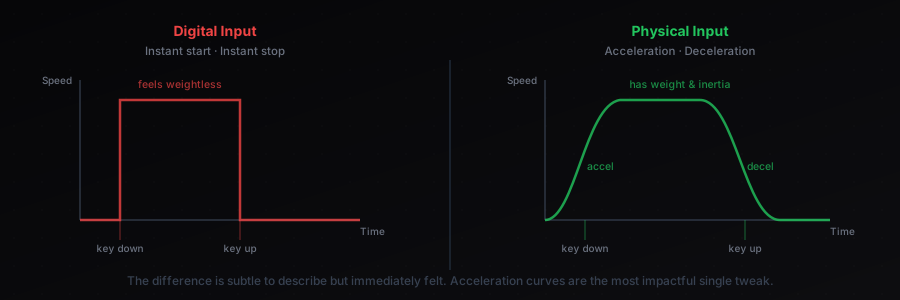
A character that starts moving the instant you press a key and stops the instant you release it feels unnatural, even though it’s “technically correct.” Real physical objects have inertia, they accelerate and decelerate. Adding a small amount of acceleration and deceleration (tweaked until it’s subtle but present) transforms input response from digital to physical.
The same principle applies to everything: attacks that have windup and recovery, bullets that have a tiny spawn delay, menus that have easing. None of these are strictly necessary. All of them make the game feel better.
The camera is an instrument
In most games, the camera is treated as a utility, it follows the player, maybe with some lag, done. Great games treat the camera as an expressive tool.
Camera techniques that contribute significantly to game feel:
- Trauma-based screen shake: instead of directly setting a shake offset, accumulate a “trauma” value that decays over time and drives the shake. Gives control over intensity and duration separately.
- Look-ahead: offset the camera in the direction of movement or aim so players see more of where they’re going. Reduces the claustrophobic feeling of a tight follow camera.
- Camera rooms: in sidescrollers, constraining the camera to defined regions prevents disorienting transitions and lets designers control exactly what players see.
- Squash and stretch on landing: briefly squashing the camera vertically when a character lands, then releasing it, adds physical weight without touching the character at all.
None of this is visible on a feature list. It’s all felt.
Sound is 50% of the feel
Turn off the sound in a well-made action game and watch how quickly it feels wrong. Sound isn’t supporting visuals, it’s doing equal work.
The key insight: sound in games isn’t about accuracy, it’s about feedback. A punching sound that’s slightly louder than realistic, an explosion that’s slightly slower than physically correct, these feel more real than accurate sound because they communicate impact more clearly.
Practical techniques that move the needle:
- Pitch variation on repeat sounds: randomize pitch by ±5-10% on any sound that plays frequently. Footsteps, UI clicks, gunshots. Without this, repetition becomes grating in minutes.
- Layered sound design: build sounds from multiple layers, attack, body, tail, and vary them independently for different intensities.
- Audio occlusion: sounds through walls should be muffled. Even a simple low-pass filter applied based on wall count is a dramatic improvement over hard volume dropoff.
The constraint that creates feel
Here’s the counterintuitive thing: constraints produce game feel, not freedom. A game with instant, weightless movement has no feel. Give that movement a speed limit, acceleration curve, and some friction, and suddenly choices matter.
The button press becomes meaningful when there’s a response arc, a beginning, middle, and end. The sword swing feels powerful because you committed to an animation. The jump arc is satisfying because you had to judge it.
Game feel is the craft of making every interaction feel like it has physical consequence. That craft lives in the parameters, the numbers attached to every response curve, delay, and animation timing. Getting them right is iteration. Knowing what you’re iterating toward is design.